Showing posts with label data. Show all posts

Wednesday, February 5, 2025

Develop simple REST API with PHP and MySQL

 Overview

In this article we will develop is simple REST API with PHP. The database backend is MySQL running in a Docker container and the sample data represents students.

Source code: https://github.com/medhatelmasry/school-api

Getting Started

Start MySQL in a Docker container with:

docker run -d -p 3333:3306 --name maria -e MYSQL_ROOT_PASSWORD=secret mariadb:10.7.3

In a working directory named school-api, create the following sub-folders:

mkdir src
cd src
mkdir Controller
mkdir System
mkdir TableGateways
cd ..
mkdir public

Add a composer.json file in the top directory with just one dependency: the DotEnv library which will allow us to keep our authentication details in a .env file outside our code repository:


Contents of the composer.json file:

{
    "require": {
        "vlucas/phpdotenv": "^2.4"
    },
    "autoload": {
        "psr-4": {
            "Src\\": "src/"
        }
    }
}

We also configured a PSR-4 autoloader which will automatically look for PHP classes in the /src directory.

We can install our dependencies with:

composer install

We now have a /vendor directory, and the DotEnv dependency is installed (we can also use our autoloader to load our classes from /src with no include() calls).

Let’s create a .gitignore file for our project with two lines in it, so the /vendor directory and our local .env file are ignored if our code is pushed to source control. Add this to .gitignore:

vendor/
.env

Next, add a .env file where we’ll put our database connection details:

DB_CONNECTION=mysql
DB_HOST=127.0.0.1
DB_PORT=3333
DB_DATABASE=apidb
DB_USERNAME=root
DB_PASSWORD=secret

Add a bootstrap.php file to load environment variables.

<?php
error_reporting(E_ALL & ~E_DEPRECATED);

require 'vendor/autoload.php';

use Dotenv\Dotenv;

use Src\System\DatabaseConnector;

$dotenv = new DotEnv(__DIR__);
$dotenv->load();

$dbConnection = (new DatabaseConnector())->getConnection();

Configure DB for PHP REST API

We can now create a class to hold our database connection and add the initialization of the connection to our bootstrap.php file. In the src/System/ folder, add a file named DatabaseConnector.php with this code:

<?php
namespace Src\System;
class DatabaseConnector {
    private $dbConnection = null;
    public function __construct() {
        $host = getenv('DB_HOST');
        $port = getenv('DB_PORT');
        $db   = getenv('DB_DATABASE');
        $user = getenv('DB_USERNAME');
        $pass = getenv('DB_PASSWORD');
        try {
            $pdo = new \PDO("mysql:host=$host;port=$port;charset=utf8mb4", $user, $pass);
            $pdo->exec("CREATE DATABASE IF NOT EXISTS `$db`");
        } catch (\PDOException $e) {
            die("DB ERROR: " . $e->getMessage());
        }
        try {
            $this->dbConnection = new \PDO(
                "mysql:host=$host;port=$port;charset=utf8mb4;dbname=$db",
                $user,
                $pass
            );
        } catch (\PDOException $e) {
            exit($e->getMessage());
        }
    }
         public function getConnection() {
        return $this->dbConnection;
    }
}

Let’s create a dbseed.php file which creates a students table and inserts some records for testing. Code for dbseed.php is shown below:

<?php
require 'bootstrap.php';
$statement = "
    CREATE TABLE IF NOT EXISTS students (
        id INT NOT NULL AUTO_INCREMENT,
        firstname VARCHAR(40) NOT NULL,
        lastname VARCHAR(40) NOT NULL,
        school VARCHAR(40) NOT NULL,
        PRIMARY KEY (id)
    );
    INSERT INTO students
        (firstname, lastname, school)
    VALUES
        ('Mark', 'Fisher','Computing'),
        ('Lisa', 'Fisher','Computing'),
        ('Judy', 'Fisher','Computing'),
        ('Jane', 'Smith','Nursing'),
        ('Mary', 'Smith','Nursing'),
        ('Andy', 'Smith','Nursing'),
        ('Bill', 'Smith','Business'),
        ('Fred', 'Plumber','Business'),
        ('Anna', 'Plumber','Business');
";
try {
    $createTable = $dbConnection->exec($statement);
    echo "Success!\n";
} catch (\PDOException $e) {
    exit($e->getMessage());
}

Run the following command to seed the database with sample data:

php dbseed.php

Add a Gateway Class for students table

In the src/TableGateways/StudentsGateway.php class file, we will implement methods to return all students, return a specific student and add/update/delete a student:

<?php
namespace Src\TableGateways;
class StudentsGateway {
    private $db = null;
    public function __construct($db) {
        $this->db = $db;
    }
    public function findAll() {
        $statement = "
            SELECT 
                id, firstname, lastname, school
            FROM
                students;
        ";
        try {
            $statement = $this->db->query($statement);
            $result = $statement->fetchAll(\PDO::FETCH_ASSOC);
            return $result;
        } catch (\PDOException $e) {
            exit($e->getMessage());
        }
    }
    public function find($id) {
        $statement = "
            SELECT 
                id, firstname, lastname, school
            FROM
                students
            WHERE id = ?;
        ";
        try {
            $statement = $this->db->prepare($statement);
            $statement->execute(array($id));
            $result = $statement->fetchAll(\PDO::FETCH_ASSOC);
            return $result;
        } catch (\PDOException $e) {
            exit($e->getMessage());
        }    
    }
    public function insert(Array $input) {
        $statement = "
            INSERT INTO students 
                (firstname, lastname, school)
            VALUES
                (:firstname, :lastname, :school);
        ";
        try {
            $statement = $this->db->prepare($statement);
            $statement->execute(array(
                'firstname' => $input['firstname'],
                'lastname'  => $input['lastname'],
                'school' => $input['school'] ?? null,
            ));
            return $statement->rowCount();
        } catch (\PDOException $e) {
            exit($e->getMessage());
        }    
    }
    public function update($id, Array $input) {
        $statement = "
            UPDATE students
            SET 
                firstname = :firstname,
                lastname  = :lastname,
                school = :school
            WHERE id = :id;
        ";
        try {
            $statement = $this->db->prepare($statement);
            $statement->execute(array(
                'id' => (int) $id,
                'firstname' => $input['firstname'],
                'lastname'  => $input['lastname'],
                'school' => $input['school'] ?? null,
            ));
            return $statement->rowCount();
        } catch (\PDOException $e) {
            exit($e->getMessage());
        }    
    }
    public function delete($id) {
        $statement = "
            DELETE FROM students
            WHERE id = :id;
        ";
        try {
            $statement = $this->db->prepare($statement);
            $statement->execute(array('id' => $id));
            return $statement->rowCount();
        } catch (\PDOException $e) {
            exit($e->getMessage());
        }    
    }
}

Implement the PHP REST API

Our REST API will have the following endpoints:

return all recordsGET /students
return a specific recordGET /students/{id}
create a new recordPOST /students
update an existing recordPUT /students/{id}
delete an existing recordDELETE /students/{id}

Create a src/Controller/StudentsController.php to handle the API endpoints with this code:

<?php
namespace Src\Controller;
use Src\TableGateways\StudentsGateway;
class StudentsController {
    private $db;
    private $requestMethod;
    private $id;
    private $studentsGateway;
    public function __construct($db, $requestMethod, $id) {
        $this->db = $db;
        $this->requestMethod = $requestMethod;
        $this->id = $id;
        $this->studentsGateway = new StudentsGateway($db);
    }
    public function processRequest() {
        switch ($this->requestMethod) {
            case 'GET':
                if ($this->id) {
                    $response = $this->getById($this->id);
                } else {
                    $response = $this->getAll();
                };
                break;
            case 'POST':
                $response = $this->createRequest();
                break;
            case 'PUT':
                $response = $this->updateFromRequest($this->id);
                break;
            case 'DELETE':
                $response = $this->deleteById($this->id);
                break;
            default:
                $response = $this->notFoundResponse();
                break;
        }
        header($response['status_code_header']);
        if ($response['body']) {
            echo $response['body'];
        }
    }
    private function getAll() {
        $result = $this->studentsGateway->findAll();
        $response['status_code_header'] = 'HTTP/1.1 200 OK';
        $response['body'] = json_encode($result);
        return $response;
    }
    private function getById($id) {
        $result = $this->studentsGateway->find($id);
        if (! $result) {
            return $this->notFoundResponse();
        }
        $response['status_code_header'] = 'HTTP/1.1 200 OK';
        $response['body'] = json_encode($result);
        return $response;
    }
    private function createRequest() {
        $input = (array) json_decode(file_get_contents('php://input'), TRUE);
        if (! $this->validate($input)) {
            return $this->unprocessableEntityResponse();
        }
        $this->studentsGateway->insert($input);
        $response['status_code_header'] = 'HTTP/1.1 201 Created';
        $response['body'] = null;
        return $response;
    }
    private function updateFromRequest($id) {
        $result = $this->studentsGateway->find($id);
        if (! $result) {
            return $this->notFoundResponse();
        }
        $input = (array) json_decode(file_get_contents('php://input'), TRUE);
        if (! $this->validate($input)) {
            return $this->unprocessableEntityResponse();
        }
        $this->studentsGateway->update($id, $input);
        $response['status_code_header'] = 'HTTP/1.1 200 OK';
        $response['body'] = null;
        return $response;
    }
    private function deleteById($id) {
        $result = $this->studentsGateway->find($id);
        if (! $result) {
            return $this->notFoundResponse();
        }
        $this->studentsGateway->delete($id);
        $response['status_code_header'] = 'HTTP/1.1 200 OK';
        $response['body'] = null;
        return $response;
    }
    private function validate($input) {
        if (! isset($input['firstname'])) {
            return false;
        }
        if (! isset($input['lastname'])) {
            return false;
        }
        return true;
    }
    private function unprocessableEntityResponse() {
        $response['status_code_header'] = 'HTTP/1.1 422 Unprocessable Entity';
        $response['body'] = json_encode([
            'error' => 'Invalid input'
        ]);
        return $response;
    }
    private function notFoundResponse() {
        $response['status_code_header'] = 'HTTP/1.1 404 Not Found';
        $response['body'] = null;
        return $response;
    }
}

Finally, create a /public/index.php file to serve as the front controller to process requests:

<?php
require "../bootstrap.php";

use Src\Controller\StudentsController;

header("Access-Control-Allow-Origin: *");
header("Content-Type: application/json; charset=UTF-8");
header("Access-Control-Allow-Methods: OPTIONS,GET,POST,PUT,DELETE");
header("Access-Control-Max-Age: 3600");
header("Access-Control-Allow-Headers: Content-Type, Access-Control-Allow-Headers, Authorization, X-Requested-With");  
 
$uri = parse_url($_SERVER['REQUEST_URI'], PHP_URL_PATH);
$uri = explode( '/', $uri ); 
 
// all of our endpoints start with /students
// everything else results in a 404 Not Found
if ($uri[1] !== 'students') {
    header("HTTP/1.1 404 Not Found");
    exit();
} 
 
// the id is, of course, optional and must be a number:
$id = null;
if (isset($uri[2])) {
    $id = (int) $uri[2];
} 
 
$requestMethod = $_SERVER["REQUEST_METHOD"]; 
 
// pass the request method and user ID to the StudentsController and process the HTTP request:
$controller = new StudentsController($dbConnection, $requestMethod, $id);
$controller->processRequest();

Start the web server with the following command, where switch -t starts the server in the public folder:

php -S 127.0.0.1:8888 -t public

Test your API with postman with these endpoints:

return all recordsGET http://localhost:8888/students
return a specific recordGET http://localhost:8888/students/{id}
create a new recordPOST http://localhost:8888/students
update an existing recordPUT / http://localhost:8888/students/{id}
delete an existing recordDELETE http://localhost:8888/students/{id}


Wednesday, January 18, 2023

Refining your ASP.NET data annotations

In this tutorial, we will learn some of the most important data annotations that are used when modeling a simple class in ASP.NET. Some of these annotations pertain to validations, others pertain to database related schemas and constraints, and yet others pertain to data formatting. Although all these concepts work for both ASP.NET MVC and Razor Pages, we will be using Razor Pages in this tutorial.

Source Code: https://github.com/medhatelmasry/AnnotationsDemo

Companion Video: https://www.youtube.com/watch?v=6_twITOH-Tc

Assumptions

It is assumed that you have the following installed on your computer:

  • .NET 7.0
  • “dotnet-ef” tool
  • “aspnet-codegenerator” tool
  • Visual Studio code

Getting Started

In a terminal window, run the following command to creates an ASP.NET Razor Pages application that user the SQLite database with individual authentication:

dotnet new razor -f net7.0 --auth individual -o AnnotationsDemo

Change directory to where the app was created with:

cd AnnotationsDemo

Add the following packages to the application:

dotnet add package Microsoft.VisualStudio.Web.CodeGeneration.Design
dotnet add package Microsoft.EntityFrameworkCore.SqlServer

In a /Models folder, create a Student class and add to it the following code:

[Table("PublicSchoolStudent")]
[Index(nameof(School))]
public class Student {

    [Key]
    [Column(Order = 1)]
    public int StudentNumber { get; set; }

    [Required(ErrorMessage = "{0} is required.")]
    [StringLength(30, ErrorMessage = "{0} must be between {2} & {1} characters."), MinLength(2)]
    [Display(Name = "First Name")]
    public string? FirstName { get; set; }

    [Required(ErrorMessage = "{0} is required.")]
    [StringLength(30, ErrorMessage = "{0} cannot exceed {1} characters.")]
    // Allow up to 40 uppercase and lowercase 
    // characters. Use custom error.
    [RegularExpression(@"^[a-zA-Z''-'\s]{1,40}$", ErrorMessage = "Only letters allowed.")]
    [Display(Name = "Last Name")]
    public string? LastName { get; set; }

    [NotMapped]
    public string FullName {
        get {
            return $"{FirstName} {LastName}";
        }
    }

    [Key]
    [Column(Order = 2)]
    [MaxLength(60), MinLength(5)]
    public string? School { get; set; }

    [Column("Note", TypeName = "NTEXT")]
    public String? Comment { get; set; }

    [DatabaseGenerated(DatabaseGeneratedOption.Computed)]
    [Display(Name = "Created")]
    [DisplayFormat(DataFormatString = "{0:MM/dd/yyyy}")]
    public DateTime DateCreated { get; set; }

    [Range(10, 1000, ErrorMessage = "Value for {0} must be between {1} and {2}.")]
    [Display(Name = "Weight in Lbs.")]
    public int Weight;

    [DataType(DataType.EmailAddress)]
    public string? Email { get; set; }

    [Compare("Email")]
    [Display(Name = "Confirm Email Address.")]
    [DataType(DataType.EmailAddress)]
    public string? EmailConfirm { get; set; }

    [ScaffoldColumn(false)]
    public string? StudentPhotoFileName;

}

Here is an explanation of each annotation:

Class Level Annotations

Annotation What it does . . .
[Table("PublicSchoolStudent")] The database will be named PublicSchoolStudent
[Index(nameof(School))] The School column in the database will be indexed

Column Level Annotations

Annotation What it does . . .
[Key] This ensures that the property is made a Primary Key
[Key]
[Column(Order = 1)]
public int StudentNumber { get; set; }

[Key]
[Column(Order = 2)]
public string? School { get; set; }
This defines a composite key comprising StudentNumber and School

NOTE: You must add this code to the OnModelCreating() method in the database context class for this to work:

builder.Entity().HasKey(table => new {
   table.PassportNumber,
   table.IssuingCountry
});
[MaxLength(60), MinLength(5)]
public string? School { get; set; }
The maximum and minimum length of the School property is 60 and 5 respectively. Only Maxength affects the database schema.
[Required(ErrorMessage = "{0} is required.")]
public string? FirstName { get; set; }
This ensures that the FirstName property must have a value. ErrorMessage is optional.
[StringLength(30, ErrorMessage = "{0} must be between {2} & {1} characters."), MinLength(5)]
public string? FirstName { get; set; }
StringLength allows for the MaxLength and MinLength to be combines into one annotation such that the error message can describe both constraints.
[Display(Name = "First Name")]
public string? FirstName { get; set; }
Instead of FirstName, the display name will be “First Name”.
[RegularExpression(@"^[a-zA-Z''-'\s]{1,40}$", ErrorMessage = "Only letters allowed.")]
public string? LastName { get; set; }
The regular expression for LastName matches any string that contains letters or spaces.
[NotMapped]
public string FullName {
   get {
      return $"{FirstName} {LastName}";
   }
}
This property will not be mapped into the database schema because it is a calculated property in the application.
[Column("Note", TypeName = "NTEXT")]
public String? Comment { get; set; }
The Comment property in the application will be mapped as a Note column in the database of type NTEXT.
[DatabaseGenerated(DatabaseGeneratedOption.Computed)]
public DateTime DateCreated { get; set; }
The DateCreated column will be generated by the database engine.

Note: You must add the proprietary function for generating the current date in the OnModelCreating() method in the database context class. In the case of SQLite it would look like this:
builder.Entity()
   .Property(s => s.DateCreated)
   .HasDefaultValueSql("DATE('now')");

In the case of SQL Server, it would look like this:

builder.Entity()
   .Property(s => s.DateCreated)
   .HasDefaultValueSql("GETDATE()");
[DisplayFormat(DataFormatString = "{0:MM/dd/yyyy}")]
public DateTime DateCreated { get; set; }
The display format for DateCreated will be MM/dd/yyyy. Example: 10/29/2022
[Range(10, 1000, ErrorMessage = "Value for {0} must be between {1} and {2}.")]
public int Weight;
The Weight column will have a range from 10 to 1000. Both are inclusive.
[DataType(DataType.EmailAddress)]
public string? Email { get; set; }
The data type for the Email property is specified as EmailAddress
public string? Email { get; set; }

[Compare("Email")]
public string? EmailConfirm { get; set; }
The Compare annotation makes sure that EmailConfirm is equal to Email
[ScaffoldColumn(false)]
public string? StudentPhotoFileName;
The code generator will not scaffold the StudentPhotoFileName column

Add the following code to the Data/ApplicationDbContext.cs class:

protected override void OnModelCreating(ModelBuilder builder) {
  base.OnModelCreating(builder);
  builder.Entity<Student>().HasKey(table => new
  {
      table.StudentNumber,
      table.School
  });

  // GETDATE() in SQL Server
  builder.Entity<Student>()
      .Property(s => s.DateCreated)
      .HasDefaultValueSql("DATE('now')");
}

public DbSet<Student>? Students { get; set; }

We can now create and apply EF database migrations with this command:

dotnet ef migrations add m1 -o Data/Migrations

Have a look at the contents of the first *_m1.cs file in the Data/Migrations folder. This is what the command for creating the student table looks like:

protected override void Up(MigrationBuilder migrationBuilder) {
  migrationBuilder.CreateTable(
    name: "PublicSchoolStudent",
    columns: table => new {
        StudentNumber = table.Column<int>(type: "INTEGER", nullable: false),
        School = table.Column<string>(type: "TEXT", maxLength: 60, nullable: false),
        FirstName = table.Column<string>(type: "TEXT", maxLength: 30, nullable: false),
        LastName = table.Column<string>(type: "TEXT", maxLength: 30, nullable: false),
        Note = table.Column<string>(type: "NTEXT", nullable: true),
        DateCreated = table.Column<DateTime>(type: "TEXT", nullable: false, defaultValueSql: "DATE('now')"),
        Email = table.Column<string>(type: "TEXT", nullable: true),
        EmailConfirm = table.Column<string>(type: "TEXT", nullable: true)
    },
    constraints: table => {
        table.PrimaryKey("PK_PublicSchoolStudent", x => new { x.StudentNumber, x.School });
    });

  migrationBuilder.CreateIndex(
    name: "IX_PublicSchoolStudent_School",
    table: "PublicSchoolStudent",
    column: "School");
}

Note the following:
  • The name of the table is PublicSchoolStudent
  • All the model property MaxLength values are being applied to the database schema
  • The Comment property in the Student model is called Note in the database and is set of type NTEXT
  • The DateCreated column in the database has a default value generated with the DATE('now') SQLite function
  • The primary key is a composite key of StudentNumber & School
  • An index will be created on the School column
Apply the migrations with the following command:

dotnet ef database update

Let us scaffold the razor pages such that they are created inside the Pages/StudentsPages folder with this terminal window command:

dotnet aspnet-codegenerator razorpage -m Student -dc ApplicationDbContext -udl -outDir Pages/StudentPages --referenceScriptLibraries

Add this to the menu system in Pages/Shared/_Layout.cshtml:

<li class="nav-item">
  <a class="nav-link text-dark" asp-area="" asp-page="/StudentPages/Index">Student</a>
</li>
Start the application with:

dotnet watch

On the main menu, click on students. You will see a page that looks like this:


Click on “Create New”. This will display the form for adding data. Here’s your chance to check out all the column limitations that we put in place.


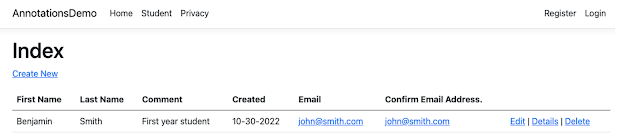
This is what the list of students looks like:

Unfortunately, clicking on Edit, Details and Delete does not work. The solution to this bug is to:

1) Edit Pages/StudentPages/Index.cshtml and replace this block:

<td>
  @Html.ActionLink("Edit", "Edit", new { /* id=item.PrimaryKey */ }) |
  @Html.ActionLink("Details", "Details", new { /* id=item.PrimaryKey */ }) |
  @Html.ActionLink("Delete", "Delete", new { /* id=item.PrimaryKey */ })
</td>

WITH

<td>
  <a asp-page="./Edit" asp-route-id="@item.StudentNumber" asp-route-school="@item.School">Edit</a> |
  <a asp-page="./Details" asp-route-id="@item.StudentNumber" asp-route-school="@item.School">Details</a> |
  <a asp-page="./Delete" asp-route-id="@item.StudentNumber" asp-route-school="@item.School">Delete</a>
</td>

2) Edit Pages/StudentPages/Edit.cshtml.cs, Pages/StudentPages/Details.cshtml.cs, and Pages/StudentPages/Delete.cshtml.cs as follows:

Change “OnGetAsync(int? id)” TO “OnGetAsync(int? id, string? school)”
Also, change 

var student =  await _context.Students.FirstOrDefaultAsync(m => m.StudentNumber == id);

TO

var student = await _context.Students.FirstOrDefaultAsync(m => m.StudentNumber == id && m.School == school);

3. Edit Pages/StudentPages/Delete.cshtml.cs. Change

OnPostAsync(int? id)

TO

OnPostAsync(int? id, string? school)

Also, change 

var student = await _context.Students.FindAsync(id);

TO

var student = await _context.Students.FirstOrDefaultAsync(m => m.StudentNumber == id && m.School == school);

The application should now work as expected.

Conclusion

This article should help you optimize your data annotations in ASP.NET